Comparison · Updated 2026
Patto vs Koozee.
Koozee gives fashion sellers a broad AI content workflow. Patto focuses on one narrower task: extracting clean, reusable pattern assets from real-world product images.
TL;DR
Choose Koozee if
you want one platform for fashion ecommerce visuals: AI try-on, model images, videos, background changes, product assets, and occasional pattern extraction.
Choose Patto if
pattern extraction is the job itself, and you need control over ratio, background removal, HD upscaling, and reusable asset quality.
The short version: Koozee is broader. Patto is more focused. For broad fashion content creation, Koozee is the fuller toolbox. For extraction quality and control, Patto is built closer to the actual pattern extraction problem.
Koozee is not trying to be a narrow pattern extraction engine. Its website positions the product as an all-in-one AI workflow for fashion ecommerce: product photos, virtual models, marketing videos, posters, background changes, and more. Pattern extraction is one tool inside that larger suite.
Patto takes the opposite approach. It focuses on pattern extraction as the core product. That focus matters when the input image is not simple, when the extracted asset needs a specific aspect ratio, or when the final file has to be clean enough for reuse beyond a one-off ecommerce image.
Feature comparison
| Dimension | Patto | Koozee |
|---|---|---|
| Primary focus | A focused AI pattern extraction engine | A broad AI fashion image and video workflow |
| Best use case | Extracting clean, reusable pattern assets from real-world product images | Creating clothing product visuals, try-on images, videos, and ecommerce content |
| Pattern extraction depth | Dedicated extraction workflow | One tool inside a larger fashion AI suite |
| Output ratio control | Yes: 1:1, 3:4, 5:8, 9:16, 9:21, 4:3, and 3:2 | Not visible in the tested extraction UI |
| Background removal control | Yes: optional background removal before extraction | Not visible in the tested extraction UI |
| HD upscale control | Yes: optional HD upscaling | Koozee states 2K output, but the tested UI does not expose a separate upscale control |
| Workflow style | Choose extraction settings, then generate a controlled asset | Upload an image, then generate |
| Product categories | Fashion, accessories, home textile, and manufacturing examples | Primarily positioned around fashion ecommerce |
Sources: Koozee public homepage and clothing pattern extractor page, accessed in 2026; Patto product interface and homepage copy. UI availability can change, so this page focuses on observed workflow differences rather than unverified private capabilities.
What Koozee offers
- A broad AI workflow for fashion ecommerce content
- Virtual try-on, model imagery, background changes, videos, posters, and product visuals
- Pattern extraction as part of a larger apparel toolkit
- The pattern extraction page states 2K output and batch upload of up to 5 images
- A downstream path from extracted patterns into fabric pattern replacement
What Patto adds
- Pattern extraction is the core workflow, not a side feature
- Selectable output ratios: 1:1, 3:4, 5:8, 9:16, 9:21, 4:3, and 3:2
- Optional background removal for cleaner reusable assets
- Optional HD upscaling for low-resolution or compressed source images
- A product scope that extends beyond clothing into accessories, home textile, and manufacturing samples
Test-case comparison
Same input image. Different extraction workflows.
The fairest way to compare these tools is not a generic feature list. Use the same source image, run Koozee with its default pattern extraction workflow, then run Patto with explicit extraction settings such as output ratio, background removal, and HD upscaling.
Clean garment print
Checks whether the tool can separate a clear front print from a simple garment photo.
Wrinkled or worn garment
Checks whether fabric folds, highlights, and shadows become unwanted artefacts in the extracted print.
Specific output ratio
Checks whether the same source image can be extracted into a target format such as 1:1, 3:4, or 9:16.
Image evidence
The same source image was tested in both tools. The two extraction outputs below show the practical difference between a broad upload-and-generate workflow and a focused extraction workflow.
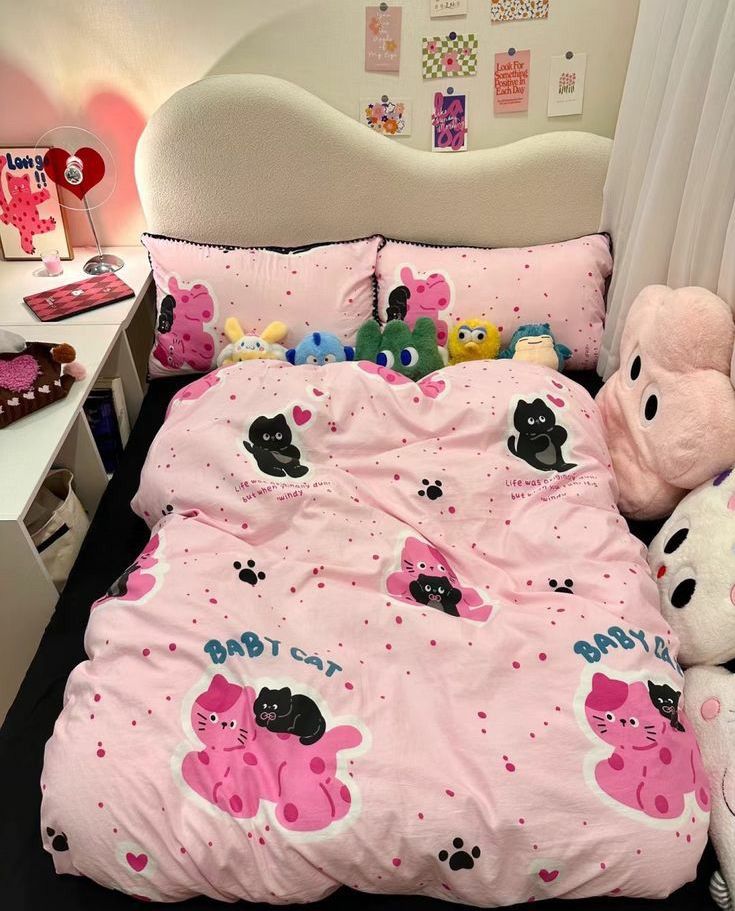
Original source image
The same source image is uploaded to both tools.
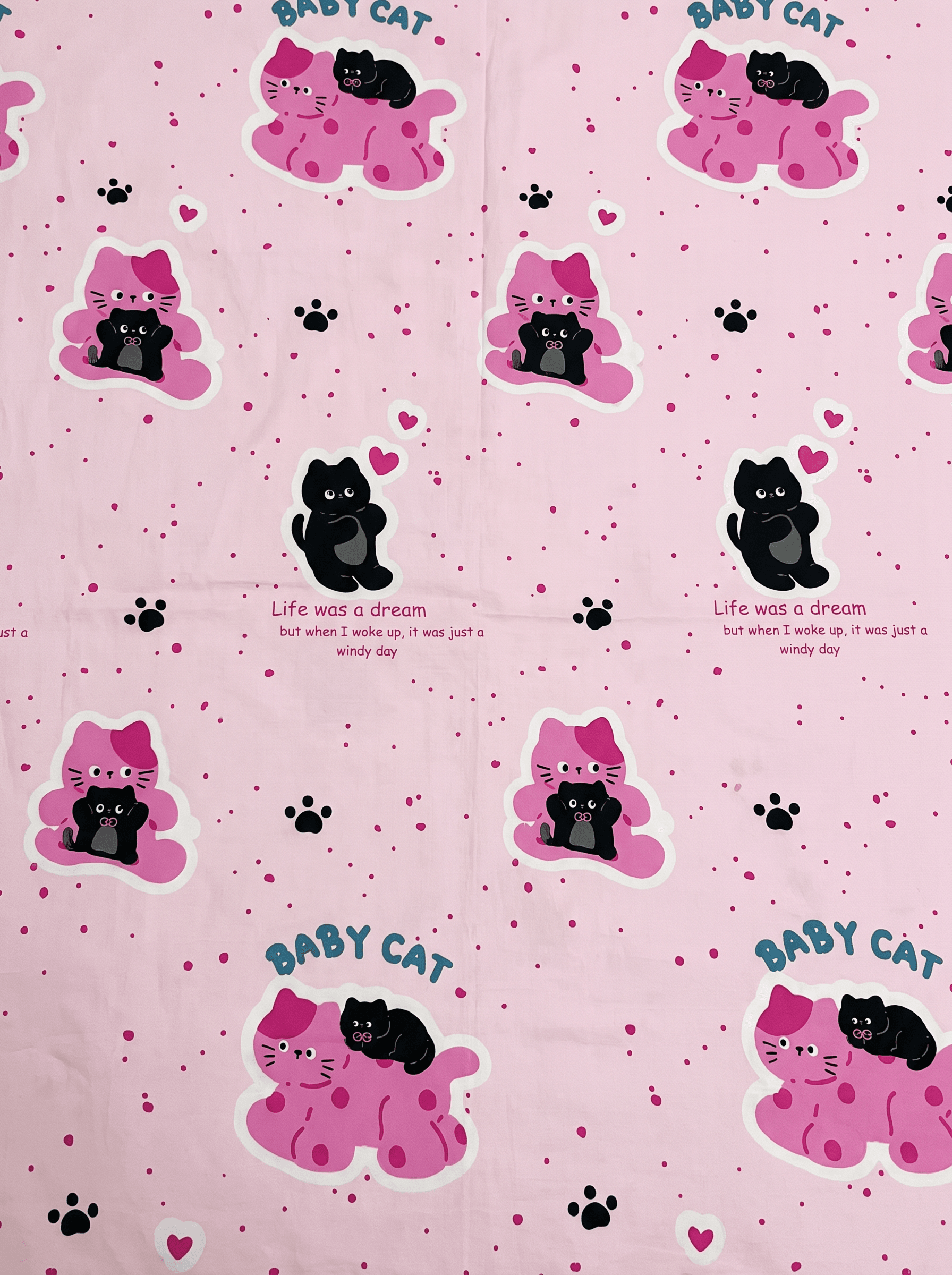
Koozee extraction result
Koozee default pattern extraction workflow output.
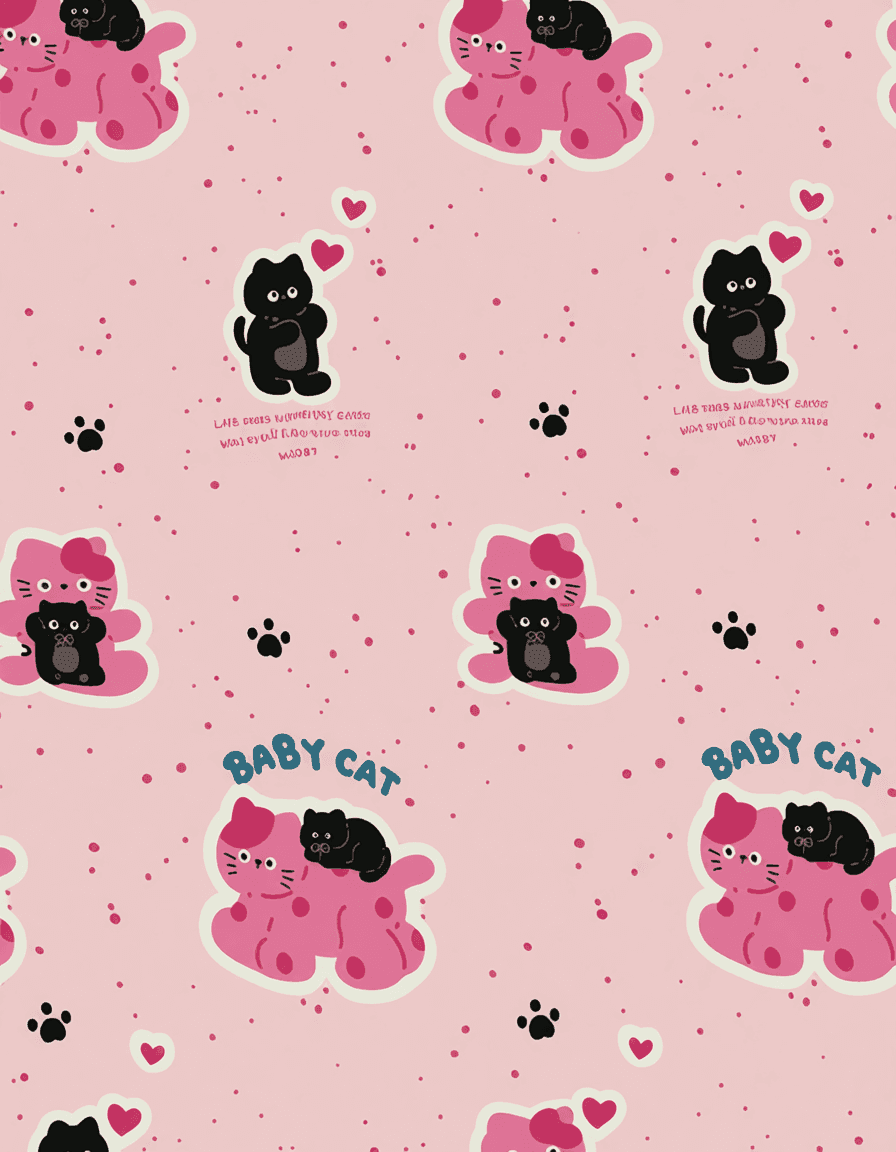
Patto extraction result
Patto output with extraction controls such as ratio, background removal, and HD upscaling.
Why focus matters for pattern extraction
Pattern extraction is not the same as image generation. The goal is not to create a prettier product image. The goal is to separate the design from the physical product photo so it can become a clean digital asset.
Ratio control
Defines how the extracted pattern fits the next use case, from square assets to vertical mobile layouts.
Background removal
Decides whether the result is a reusable design asset or just another cropped image.
HD upscaling
Matters when source images are low-resolution, compressed, or captured from marketplaces.
Cross-product focus
Matters when the same extraction engine must handle apparel, accessories, home textiles, and samples.
Pick Koozee if...
- You want one platform for many fashion ecommerce visuals.
- You need virtual try-on, model photos, videos, posters, background changes, and pattern tools together.
- Your pattern extraction needs are occasional.
- You prefer a simple upload-and-generate workflow.
- You mainly work with clothing seller content.
Pick Patto if...
- Pattern extraction is the main job, not a side feature.
- You need control over the output ratio.
- You want the option to remove the background.
- You need HD upscaling for cleaner reusable assets.
- You care about extracting patterns from more than apparel.
The verdict
Koozee is the broader fashion AI platform. Patto is the more focused pattern extraction engine.
If your team wants to create many types of ecommerce visuals from clothing images, Koozee is the more complete toolbox. If your team needs to extract clean, reusable pattern assets with control over ratio, background removal, and HD upscaling, Patto is built closer to the actual extraction problem.
Frequently asked questions
Is Patto a Koozee alternative?
Only for the pattern extraction part. Koozee covers many fashion AI workflows, while Patto focuses specifically on extracting patterns from real-world product images.
What is the biggest difference between Patto and Koozee?
Koozee is broader. Patto is narrower and more controlled. Koozee’s extraction workflow is upload-and-generate, while Patto exposes extraction settings such as output ratio, background removal, and HD upscaling.
Which tool is better for AI pattern extraction?
Use test cases rather than feature lists. If the goal is a reusable pattern asset, evaluate edge cleanliness, background separation, ratio control, colour fidelity, distortion, and manual cleanup needed.
Does Koozee support high-resolution output?
Koozee’s pattern extraction page states that it outputs 2K high-resolution pattern material. Patto exposes a separate HD upscale option in its extraction workflow.
Extract patterns. Not pixels.
Use Patto when the output needs to become a clean, controlled, reusable pattern asset — not just another generated product image.
Try Pattern Extraction